

Extracurricular language courses
Check the courses list and calendar by selecting the language you are interested in.
The enrolment procedure is available during a specific period inside each course page on the Elly portal (Language Centre category -> “CORSI DI LINGUA EXTRACURRICOLARI”).
During enrolment periods:
- go to the courses page in Elly and log in;
- choose the language you are interested in;
- take the entry or self-assessment test (you may find it either on the course page or on a dedicated page);
- complete the enrolment procedure on the course page: in the "ISCRIZIONE" section, click on “Iscrizione corso” and then on “Prenota” (after selecting your role at the University of Parma in "Tipologia partecipante").
If the maximum number of enrolments is reached, you can enrol on a waiting list (see the part “During the course” for instructions about it).
Note for courses in "distance" mode: meetings take place via video call on the Teams app, which is available within the Microsoft 365 suite associated with your University of Parma account. The code to join the virtual class is published on the course's Elly page (in the "CLASSE TEAMS" section) starting from the first day of the course.
To join the course's virtual class for the first time, access Microsoft Teams (using your UNIPR account), go to the "Teams" menu, click on "Join or create a team" > "Join a team" > "Join a team with a code", then enter the code.
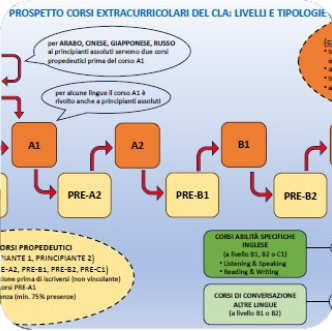 Courses overview
Back to COURSES LIST